The editor
The window
The editor is a desktop-app-shaped frame around a dock of panels, and every panel is a view of one part of the document. Nothing lives anywhere else: if a fact about the level cannot be seen in some panel, the level does not have it.
The shape of it
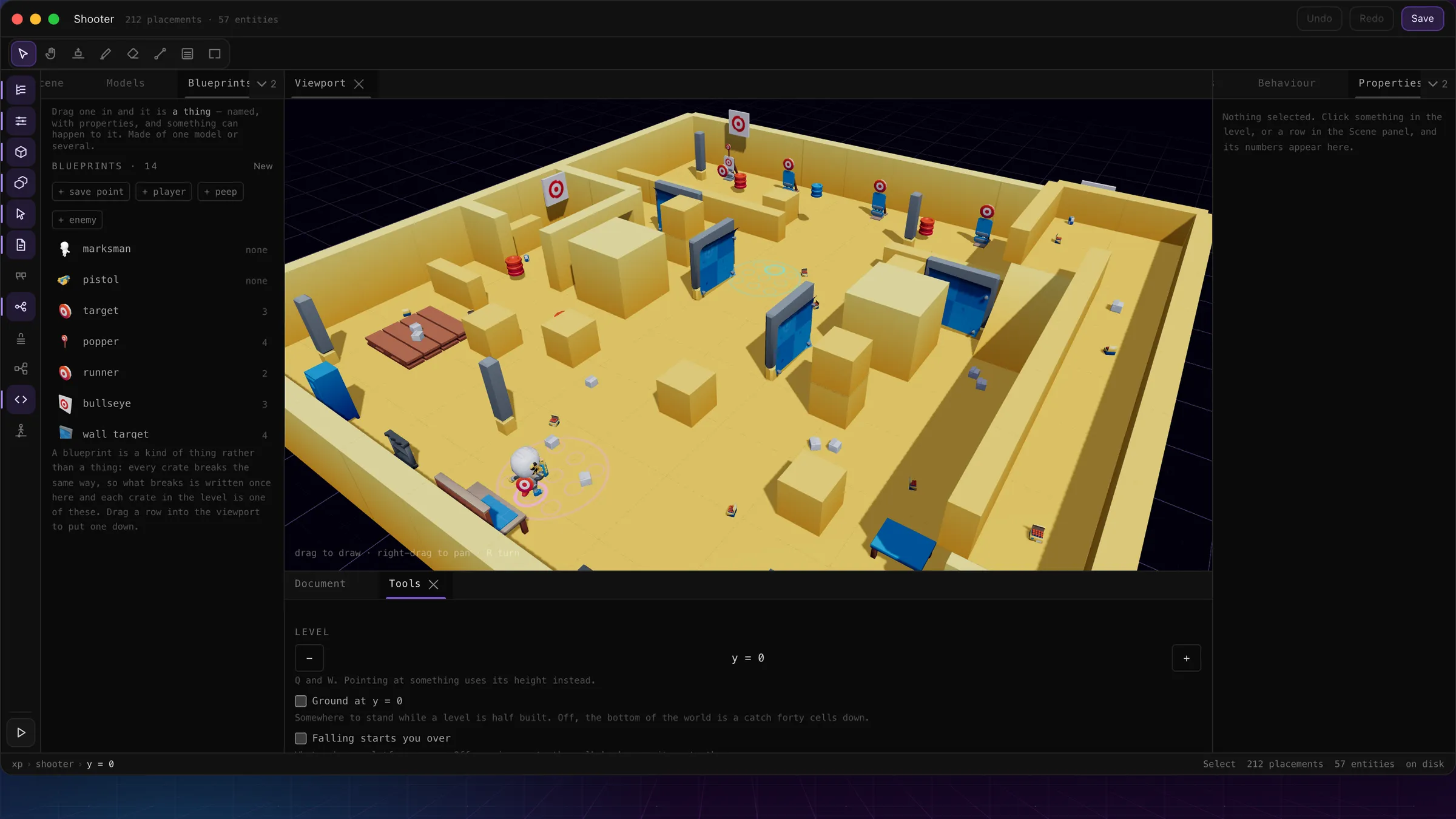
The shooter open in the editor, default layout.
- 1The title bar: the name, the live counts, undo and redo, and Save.
- 2The toolbar — what a drag in the viewport does. Eight tools, one key each.
- 3The rail: one toggle per panel. Lit means open somewhere in the dock.
- 4A dock column — Scene, Models and Blueprints tabbed together here.
- 5The viewport: the level itself. Drag to draw, right-drag to pan.
- 6The other column — Behaviour, Properties and Scripts share it.
- 7The bottom row: Document and Tools, the two you keep glanceable.
- 8Try — plays a snapshot of the level over the editor. Esc comes back.
- 9The status bar: where you are, the tool in hand, and on-disk/draft state.
Panels and the dock
Every panel can be dragged out, split against another, or stacked into a tab group; the layout saves itself per level and comes back on reload. A saved layout that no longer parses falls back to the default rather than to an empty window, and reopening a closed panel rejoins whichever column it last lived in.
Everything is optional except the viewport, which is the work. The one panel worth keeping open on faith is Document — it is the only one that tells you things you cannot see by looking.
Each panel
| Scene | Everything by name: entities (indented under what they hang from), architecture folded by model, the five kinds of mark, and the player. |
| Models | The catalogue, searchable, with a drawer of packs a level can declare. Dragging a tile in lays architecture; the packs a level uses are a real document field. |
| Blueprints | Kinds of thing — the page of their own is blueprints. |
| Properties | The form for whatever is selected: position and a drag pad, turn, scale, tilt and stretch, collider mode, and what it hangs from. |
| Behaviour | A blueprint's rules as rows — the vocabulary is on the rules page. |
| Scripts | The document's scripts, an editor with autocomplete and a dry run — see the script API. |
| Data | The level’s declared fields — what it keeps beyond a session, each scoped to the player, the space, or shared. |
| Flow | Where the level can be played, and the round it plays — see the flow editor. |
| Words | The level’s own translations: phrases keyed by the English sentence, so a level can say things in the player’s language. |
| Tools | The working height, ground on or off, what falling means, snap, and the background colour. |
| Document | The counts, the capabilities, the warnings, and — because they are document-level facts — the Mode and Camera controls. |
| Animator | The pose and clip editor, which takes the whole dock — its own page. |
Try, and the log
Try (the play button under the rail) takes a snapshot of the document and opens the real runtime over the editor — the same component the live route renders. No save, no session, no room; edits made while it is open are not reflected until you press it again. A desktop/phone toggle remounts it letterboxed with touch input, for how it feels under a thumb.
The Log keeps everything the level said this run — pickups, a script's log(), a rule that refused — and it collects whether or not the panel is open, so opening it shows what already happened rather than starting from the moment you wondered. Editor shortcuts are suppressed while trying, except Esc, which is the way back.
Saving and drafts
Every edit autosaves a draft locally, tagged with the version it was saved against — losing an afternoon's building to a refresh is the one unforgivable bug a builder can have. Reopening restores a newer draft over what is saved, and silently drops a draft older than the current server version, so it cannot clobber somebody else's newer save. The draft link in the title bar discards it and goes back to what is on disk.
A refused save shows the server's exact reason inline — including "somebody else has this project open", which is the editor telling you it is single-writer on purpose.