The editor
The player
Five questions, one page: where a person arrives, what they arrive as, how the level moves underfoot, what they can press, and what is in their hand. All of it lives on the Player row of the Scene panel and the form it opens.
Spawns, goals, and the other marks
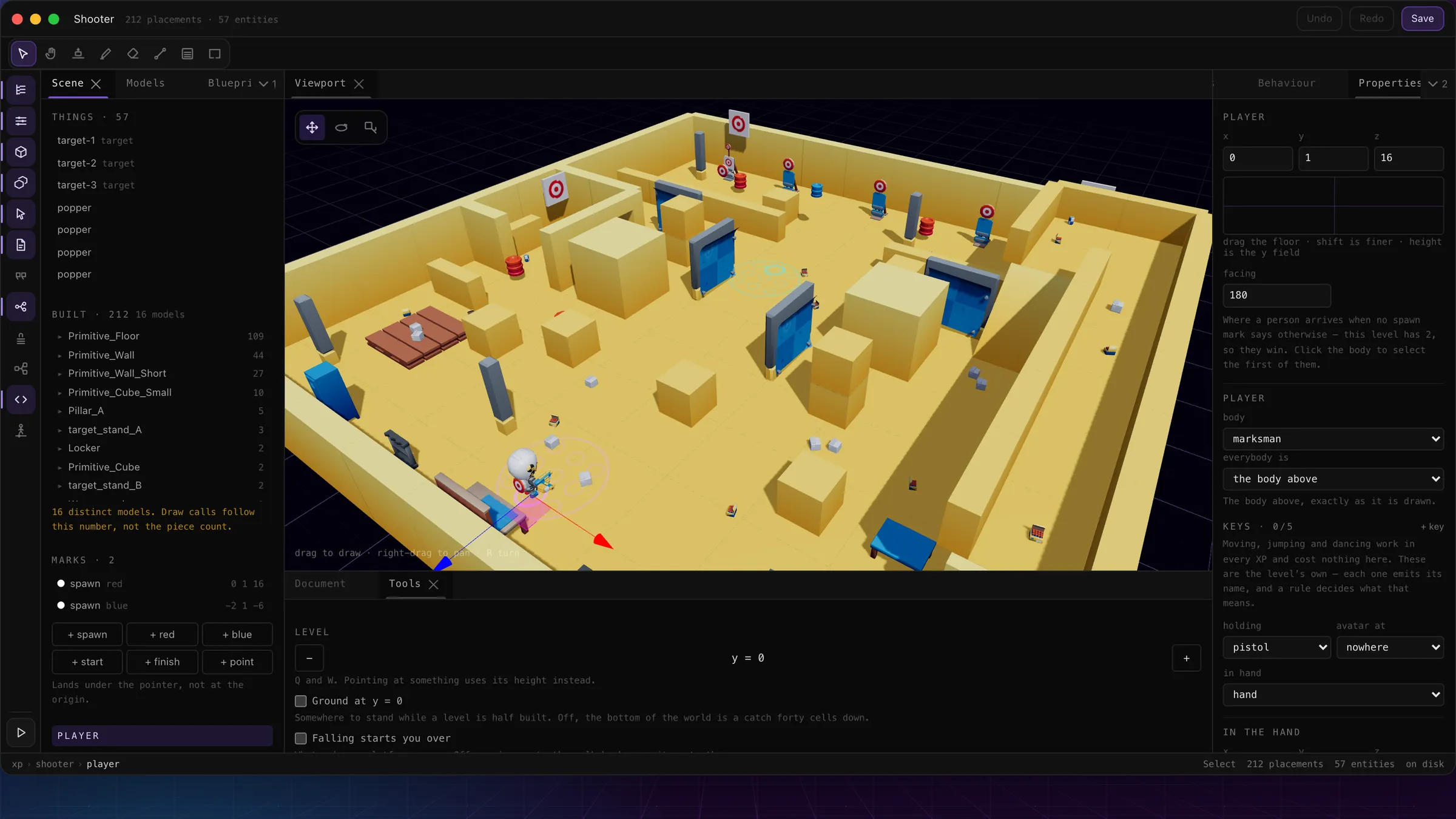
The shooter's player selected: marks bottom-left, the player form on the right.
- 1Marks — the level’s facts: a spawn per side, red and blue goals, start and finish, points. A new one lands under the pointer.
- 2The player row: one per level, selectable like anything else.
- 3Where a person arrives when no spawn mark says otherwise, and which way they face.
- 4The body — the built-in dummy, or any blueprint in the level.
- 5The level’s own keys: each emits its name, and a rule decides what that means.
- 6Holding: a blueprint on a socket. A gun is one with damage and range.
- 7The grip: six numbers for how it sits in the hand, with a reset.
Marks matter more than they look, because the document's claims are checked against them. A level that says battle needs a spawn for each side; a ball game needs a red goal and a blue goal; a race needs a start and a finish. The refusal is made in the Flow panel before the click, and by the parser on load — by name.
| spawn | Where a side starts, with a team and a facing. Spawns ignore width and height. |
| red / blue | The goals — where a side scores. A goal has a size, because a ball has to fit through it. |
| start / finish | The two ends of a race. Crossing the finish is what ranks a run. |
| point | A named spot for rules to aim at — a teleport destination, a waypoint. |
The player's own position is the fallback: where a person arrives when no spawn mark says otherwise. Set it by dragging the body in the viewport, or from the form — the drag pad moves it on the floor, height is the y field.
The body — dummy, peep, or any blueprint
Absent means the built-in dummy, and that is the common case. Everything else is a blueprint: pick one in the body dropdown and the player arrives as it — a marksman, a kart, a bird. The two starters in the Blueprints panel cover the usual cases in one press: + player makes a body from the dummy, + peep makes one from the animal skeleton — same idea, different rig, which matters the moment you animate it, because a clip is bound to its rig.
A body is a blueprint like any other: give it hp and it can be hurt, give it ammo and rounds are counted, give it a rest pose and it stands how you posed it. Once the model has sockets, avatar atchooses where the person's own avatar hangs — riding a kart rather than being one — and everybody is decides what other players arrive as; the shooter keeps everyone as the body above, exactly as it is drawn.
Movement — the level's own feel
Six numbers on the Player form, under Movement, and every one of them has a built-in the level gets by staying quiet. They are in the units a course is counted in — cells — so you can check a number against your own floor plan.
| walk · sprint | Cells a second on the ground — 7 and 13 unless you say otherwise. They are two numbers, not a multiplier: set them equal and Shift simply does nothing, which is how a board game switches sprinting off. |
| jump | Cells a single jump clears — 1.56 built in, so one block is comfortable and two are a wall. Height, not hang time: the conversion to speed runs through the level's own gravity, so a jump keeps clearing the blocks you counted whatever world it is on. |
| gravity | Cells a second squared, downwards — 26 built in, deliberately heavier than Earth so falls feel short. Lower is floatier, higher is snappier; jump and every bounce stay in cells either way. |
| acceleration · drag | How quickly the pace arrives, and how quickly a let-go stick gives it back — cells a second squared, and zero means instantly, which is the built-in feel. Ice is a small drag; a heavy kart is a small acceleration; most levels want neither. |
The warning that comes with all of them: a changed number wants its course driven, not measured. A longer jump can sail over the platform it used to land on, and a faster sprint crosses a gap the walk was sized for — the geometry checks stay green either way, because a budget can only prove a gap is crossable, never that it is still the thing you land on.
Moves, and the level's own keys
Moving costs nothing to set up: walking, sprinting, the double jump, and the camera are in every XP. Click to look, WASD to move, Shift to sprint, Space to jump — twice in the air for the second one — and V for the camera behind the body. Click fires, if the body is holding something with damage on it.
Everything else is a level key: up to five bindings, each captured by pressing the actual key — not typed as text — and paired with a name. The names offered are the conventional ones (grab, use, attack, shoot), but a name is just a name. Each key emits its name, and a rule decides what it means — the key is the vocabulary, the rules are the grammar:
the lever   on: pressed (key use, within 2)   do: emit "thrown"
the gate on: emitted "thrown" do: setProp open = 1pressedtakes an optional distance, so "press E at the lever" is one rule and no script. Two more places read the same names: a flow phase's allow gates which keys are live — a dice phase where only roll works is allow: ["roll"] — and a pressedrule cannot exist before a key does, so the picker says "bind a key first" rather than saving something that would never fire.
Worked example: making a gun
The shooter's pistol, from nothing. What makes it a gun is two properties; everything else is placement.
| 1 · The blueprint | New blueprint, pick a model. Give it damage: 25 and range: 60 — that is the whole weapon system. A blueprint with neither is just something you are carrying. |
| 2 · Into the hand | On the player form, set holding to the blueprint and in hand to the socket. Click now fires: a hit deals the damage, out to the range. |
| 3 · The grip | If it sits wrong, the grip’s six numbers move and turn it in the hand. Press Try, look, adjust — the reset puts it back. |
| 4 · Ammo, if you want it | Give the body an ammo property and rounds are counted; leave it off and they are not. Ammo lives on the player, not the gun — which is what lets an ammo box be one rule: |
the ammo box   on: enter   do: addProp ammo +12 (other)  ·  sound "pickup"
                                deactivate self, 15 seconds
Taking the gun away is a verb too: disarm and arm, from any rule — a no-weapons lobby phase is one does in the flow. The shooter write-up shows the whole loadout in play.